비주얼 스튜디오를 설치할 때마다 자꾸만 나타나 설치를 막는 오류가 하나 있다.
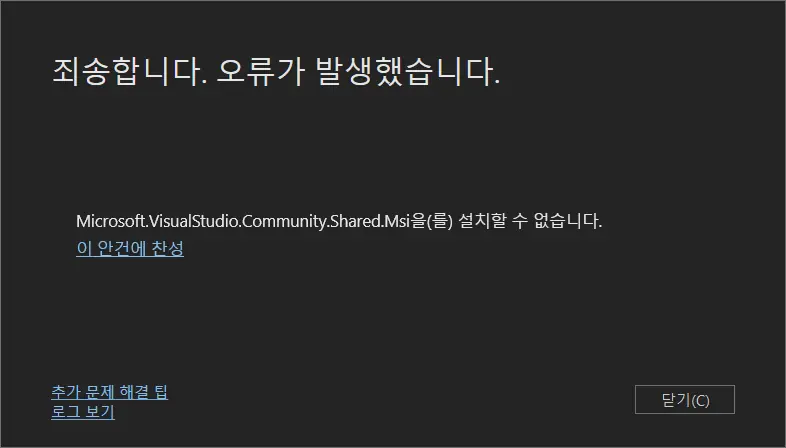
사람마다 정확한 오류 로그의 내용은 다를 수 있겠지만, 나의 경우는 아래와 같은 이유로 Microsoft.VisualStudio.MinShell.Msi.Resources 설치가 실패했다.
'Microsoft.VisualStudio.MinShell.Msi.Resources,version=18.7.11811.120,language=ko-KR' 패키지를 설치하지 못했습니다.
    검색 URL
        https://aka.ms/VSSetupErrorReports?q=PackageId=Microsoft.VisualStudio.MinShell.Msi.Resources;PackageAction=Install;ReturnCode=1406
    세부 정보
        MSI: C:\ProgramData\Microsoft\VisualStudio\Packages\Microsoft.VisualStudio.MinShell.Msi.Resources,version=18.7.11811.120,language=ko-KR\Microsoft.VisualStudio.MinShell.Msi.Resources.msi, 속성:  REBOOT=ReallySuppress ARPSYSTEMCOMPONENT=1  MSIFASTINSTALL="7"  VSEXTUI="1"
        반환 코드: 1603
        반환 코드 세부 정보: 설치를 하는 동안 오류가 발생했습니다.
        메시지 ID: 1406
        메시지 세부 정보: 키 \Software\Classes\Directory\shell\AnyCode에 값 을(를) 쓰지 못했습니다.  그 키에 대한 액세스 권한이 충분한지 검증하거나 고객 지원 담당자에게 문의하십시오.
겉보기에는 HKLM\Software\Classes\Directory\shell\AnyCode 키를 생성하면 끝날 일처럼 보이지만, 직접 손으로 AnyCode 키를 만들어도 이 오류는 사라지지 않는다.
그래서 이걸 해결하려 갖은 애를 쓰던 중, 저 오류의 해결법을 찾은 것 같다.
1. 비주얼 스튜디오 삭제
비주얼 스튜디오 설치가 중간에 실패했다는 건 설치가 성공한 부분과 설치가 실패한 부분이 공존하고 있다는 의미이고, 이걸 그대로 방치한 채 다시 설치를 시도하는 건 그렇지 않아도 꼬여 있는 시스템을 더 꼬아버리는 행위가 될 수 있다.
따라서 현재 시스템에 설치된, 비주얼 스튜디오와 관련한 모든 것을 전부 말끔하게 지워야 한다.
관리자 권한으로 명령 프롬프트를 연 후, 다음 경로로 이동하여 InstallCleanup.exe를 -f 매개 변수와 함께 실행한다.
> cd /d "C:\Program Files (x86)\Microsoft Visual Studio\Installer"
> InstallCleanup.exe -f
MS가 공식으로 제공하는 도구인 만큼, 제법 말끔하게 청소해 준다.
이후, CCleaner 등의 도구를 이용해 시스템에 남은 파일과 레지스트리 값을 정리해 주면 된다.
2. 임시 파일 청소
비주얼 스튜디오 인스톨러를 비롯한 여러 프로그램이 남긴, 임시 폴더의 내용물도 말끔히 비워야 한다.
이러한 임시 파일은 대부분 %TEMP%, %TMP%에 저장되어 있고, 별도로 해당 환경 변수를 수정하지 않은 한 다음 경로에 저장되어 있다.
%LocalAppData%\Temp%WinDir%\TEMP
파일 탐색기를 열어 두 경로 아래에 있는 모든 파일과 폴더를 지울 수 있을 만큼 지우면 된다.
간혹 사용 중이라며 삭제가 되지 않는 파일이나 폴더가 있을 수 있는데, 재부팅 후에 다시 삭제를 시도해 보고, 그래도 삭제가 되지 않으면 그냥 넘어가면 된다.
3. Windows Installer 등록 정보 정리
Windows Installer는 설치 중 오류가 발생할 시, 등록 정보는 생성하지만 실제 설치는 수행하지 않는 경우가 있다.
문제는 이 남은 등록 정보가 프로그램을 (재)설치하는 걸 방해한다는 점이다.
여기에서 PowerShell 스크립트를 다운로드하여 관리자 권한으로 실행한다.
> powershell -File Unregister-MissingMSIs.ps1#Requires -Version 3
# The MIT License (MIT)
# Copyright (C) Microsoft Corporation. All rights reserved.
#
# Permission is hereby granted, free of charge, to any person obtaining a copy of this software and associated documentation files (the "Software"), to deal in the Software without restriction, including without limitation the rights to use, copy, modify, merge, publish, distribute, sublicense, and/or sell copies of the Software, and to permit persons to whom the Software is furnished to do so, subject to the following conditions:
#
# The above copyright notice and this permission notice shall be included in all copies or substantial portions of the Software.
#
# THE SOFTWARE IS PROVIDED "AS IS", WITHOUT WARRANTY OF ANY KIND, EXPRESS OR IMPLIED, INCLUDING BUT NOT LIMITED TO THE WARRANTIES OF MERCHANTABILITY, FITNESS FOR A PARTICULAR PURPOSE AND NONINFRINGEMENT. IN NO EVENT SHALL THE AUTHORS OR COPYRIGHT HOLDERS BE LIABLE FOR ANY CLAIM, DAMAGES OR OTHER LIABILITY, WHETHER IN AN ACTION OF CONTRACT, TORT OR OTHERWISE, ARISING FROM, OUT OF OR IN CONNECTION WITH THE SOFTWARE OR THE USE OR OTHER DEALINGS IN THE SOFTWARE.
[CmdletBinding(SupportsShouldProcess = $true)]
param (
[Parameter(Position = 0, ValueFromPipeline = $true)]
[ValidateNotNullOrEmpty()]
[string[]] $ProductCode
)
$ErrorActionPreference = 'Stop'
[int[]] $translation = 7,6,5,4,3,2,1,0,11,10,9,8,15,14,13,12,17,16,19,18,21,20,23,22,25,24,27,26,29,28,31,30
$loc = data {
ConvertFrom-StringData @'
Error_Elevation_Required = You must run this script in an elevated command prompt
Error_64Bit_Required = You must run this in a 64-bit command prompt
Error_PackageManagement_Required = Please install PackageManagement from http://go.microsoft.com/fwlink/?LinkID=746217
Process_Remove_Args1 = Remove registration for {0}
Verbose_Install_MSI = Installing the "MSI" module
Verbose_Scan_Missing = Scanning for products missing cached packages
Verbose_Remove_Key_Args1 = Removing registry key {0}
Verbose_Remove_Value_Args2 = Removing registry value {1} from {0}
Verbose_Remove_Source_Reg = Removing source registration
Verbose_Remove_Product_Reg = Removing product registration
Verbose_Remove_Upgrade_Reg = Removing upgrade registration
Verbose_Remove_Component_Reg = Removing component registration
Verbose_Found_Source_Args2 = Cache missing for {0} but found source at {1}
'@
}
$identity = [System.Security.Principal.WindowsIdentity]::GetCurrent()
$principal = New-Object System.Security.Principal.WindowsPrincipal $identity
if (!$principal.IsInRole([System.Security.Principal.WindowsBuiltInRole]::Administrator)) {
throw $loc.Error_Elevation_Required
}
if ([System.Environment]::Is64BitOperatingSystem) {
if (![System.Environment]::Is64BitProcess) {
throw $loc.Error_64Bit_Required
}
}
$pack = {
param (
[string] $Guid
)
if (!$Guid) {
return
}
$Guid = (New-Object System.Guid $Guid).ToString("N").ToUpperInvariant()
$sb = New-Object System.Text.StringBuilder $translation.Count
foreach ($i in $translation) {
$null = $sb.Append($Guid[$i])
}
$sb.ToString()
}
$test = {
param (
$Product
)
if ($Product.PSPath -and ($Product | Test-Path)) {
return $true
}
if ($Product.PackageName) {
$Product | Get-MSISource | ForEach-Object {
$path = Join-Path $_.Path $Product.PackageName
if ($path | Test-Path) {
Write-Verbose ($loc.Verbose_Found_Source_Args2 -f $Product.ProductCode, $path)
return $true
}
}
}
$false
}
$remove = {
param (
[string] $Key
)
if (Test-Path $Key) {
Write-Verbose ($loc.Verbose_Remove_Key_Args1 -f $Key)
Remove-Item -Recurse -Force -UseTransaction $Key
}
}
$removeChild = {
param (
[string] $Key,
[string] $Name
)
if (Test-Path $Key) {
Get-ChildItem $Key | ForEach-Object {
$obj = $_ | Get-ItemProperty
if ($obj.$Name -ne $null) {
Write-Verbose ($loc.Verbose_Remove_Value_Args2 -f $_.Name, $Name)
Remove-ItemProperty -Force -UseTransaction -Name $Name -LiteralPath $_.PSPath
$obj = Get-ItemProperty -UseTransaction -LiteralPath $_.PSPath
if (!$obj) {
Write-Verbose ($loc.Verbose_Remove_Key_Args1 -f $_.Name)
Remove-Item -Recurse -Force -UseTransaction -LiteralPath $_.PSPath
}
}
}
}
}
if (!$ProductCode) {
# Install the MSI module if missing.
if (!(Get-Module -ListAvailable MSI)) {
Write-Verbose $loc.Verbose_Install_MSI
# Make sure PackageManagement is installed (comes with WMF 5.0 / Windows 10).
if (!(Get-Module -ListAvailable PackageManagement)) {
throw $loc.Error_PackageManagement_Required
}
Install-Module MSI -Scope CurrentUser -SkipPublisherCheck -Force
}
Write-Verbose $loc.Verbose_Scan_Missing
foreach ($msi in (Get-MSIProductInfo -UserContext Machine)) {
if (!(&$test $msi)) {
$ProductCode += $msi.ProductCode
}
}
}
foreach ($code in $ProductCode) {
if ($PSCmdlet.ShouldProcess($msi, $loc.Process_Remove_Args1 -f $code)) {
$packedProductCode = &$pack $code
Start-Transaction
Write-Verbose $loc.Verbose_Remove_Source_Reg
&$remove "Registry::HKEY_LOCAL_MACHINE\SOFTWARE\Classes\Installer\Products\$packedProductCode"
&$remove "Registry::HKEY_LOCAL_MACHINE\SOFTWARE\Classes\Installer\Features\$packedProductCode"
Write-Verbose $loc.Verbose_Remove_Product_Reg
&$remove "Registry::HKEY_LOCAL_MACHINE\SOFTWARE\Microsoft\Windows\CurrentVersion\Installer\UserData\S-1-5-18\Products\$packedProductCode"
&$remove "Registry::HKEY_LOCAL_MACHINE\SOFTWARE\Microsoft\Windows\CurrentVersion\Uninstall\$code"
&$remove "Registry::HKEY_LOCAL_MACHINE\SOFTWARE\WOW6432Node\Microsoft\Windows\CurrentVersion\Uninstall\$code"
Write-Verbose $loc.Verbose_Remove_Upgrade_Reg
&$removeChild "Registry::HKEY_LOCAL_MACHINE\SOFTWARE\Microsoft\Windows\CurrentVersion\Installer\UpgradeCodes" $packedProductCode
Write-Verbose $loc.Verbose_Remove_Component_Reg
&$removeChild "Registry::HKEY_LOCAL_MACHINE\SOFTWARE\Microsoft\Windows\CurrentVersion\Installer\UserData\S-1-5-18\Components" $packedProductCode
Complete-Transaction
}
}
<#
.SYNOPSIS
Removes Windows Installer product registrtation for missing or specified MSIs
.DESCRIPTION
If Windows Installer product registration is corrupt (exit code 1610) or package
sources are missing (exit code 1603, error message 1714; or exit code 1612),
you can use this script in an elevated PowerShell command shell to clean up the
registration is a transactional manner to avoid making machine state worse.
Please note that this should be a last resort and only for those issues above.
The old msizap.exe program was frought with issues and can make matters worse
if not used properly.
.PARAMETER ProductCode
Optional list of ProductCode to clean up; otherwise, ProductCodes are scanned
from products with missing sources.
.EXAMPLE
PS> Unregister-MissingMSIs.ps1
Removes per-machine product registration for products with missing cached MSIs.
.EXAMPLE
PS> Unregister-MissingMSIs.ps1 '{7B88D6BB-A664-4E5A-AB81-C435C8639A4D}'
Remove per-machine product registration for the specified ProductCode only.
#>스크립트 최초 실행 시 MSI PowerShell 모듈을 다운로드하는데, Windows Installer 관련 작업을 하는데 필요한 것이니 허용해 주면 된다.
4. sfc /scannow 실행
Windows Installer는 몹시 까탈스러워 시스템 무결성이 손상된 상태에서 설치가 실패할 수 있다고 하므로, SFC(System File Checker)를 이용해 시스템 무결성을 확인해야 한다.
관리자 권한으로 다음 명령어를 실행한다.
> sfc /scannow내 시스템은 포맷한 지 얼마 되지 않아 전혀 문제가 없을 거라 생각했는데, SFC를 실행하니 두세 개 정도의 오류가 자동 수정된 것을 확인할 수 있었다.
검사가 끝나면 반드시 재부팅을 해야 한다.
5. 레지스트리 키 사용 권한 수정
개인적으로 HKLM의 키는 소유자를 변경해서는 안된다고 생각하지만, 시스템의 유일한 사용자가 나 자신이었으므로 그냥 변경했다.
- 다음 두 경로에
AnyCode라는 키를 생성한다.HKLM\SOFTWARE\Classes\Directory\shellHKLM\SOFTWARE\Classes\Directory\Background\shell
- 각
AnyCode키에 대해 다음 작업을 수행한다.AnyCode를 우클릭한 후, '사용 권한'을 클릭한다.- 다음과 같이 설정한다.
- 그룹 또는 사용자 이름:
SYSTEM,Administrators, '현재 사용자'를 추가한 후, 셋 모두에게 '모든 권한'을 부여한다. - 고급 - 소유자:
Administrators를 '현재 사용자'로 변경한다.
- 그룹 또는 사용자 이름:
6. MSI 수동 설치
오류 로그에 적힌 대로, C:\ProgramData\Microsoft\VisualStudio\Packages\Microsoft.VisualStudio.MinShell.Msi.Resources,version=18.7.11811.120,language=ko-KR을 열면 MSI 파일(Microsoft.VisualStudio.MinShell.Msi.Resources.msi)이 하나 보일 것이다.
관리자 권한으로 명령 프롬프트를 연 뒤, 해당 파일을 실행한다.
> Microsoft.VisualStudio.MinShell.Msi.Resources.msi오류 창 없이 MSI 설치 창이 닫혔다면 다시 비주얼 스튜디오 인스톨러를 열어 처음 시도했던 구성을 다시 시도하면 된다.
![[Visual Studio] UI 요소 숨기기](/d/development/visual-studio-hide-ui-element/logo.64e4d119ae00189abe69768e00da86a8.webp)
![[Debian] 마인크래프트 서버 설치기 (2) - 마인크래프트 서버](/d/server/debian-minecraft-server-2/logo.86ca6ab6e86a276b4ae79d7fa1bea66f.webp)
![[Debian] 마인크래프트 서버 설치기 (1) - 데비안 설치](/d/server/debian-minecraft-server-1/logo.86ca6ab6e86a276b4ae79d7fa1bea66f.webp)
![[Go] 바이너리 파일 크기 줄이기](/d/development/go-reduce-binary-size/go.bf1d3c89973bfed4966f685e124cfdfa.webp)
![[Windows] UAC 확인창 없이 관리자 권한으로 프로그램 실행하기](/d/desktop/skip-uac-prompt/logo.b3b0aec18985fff34c5295de475fdff7.webp)
![[Prism Launcher] 설정](/d/game/prism-launcher-configuration/logo.f3d9c39d1f7cfd4c479d6d90c4917eb2.webp)
![[Prism Launcher] 설치](/d/game/prism-launcher-install/logo.f3d9c39d1f7cfd4c479d6d90c4917eb2.webp)
![[Windows] 업그레이드 차단하기](/d/desktop/windows-block-upgrade/logo.1dc0ab65e12a8e9a0bb1ae2f179d7a83.webp)
![[macOS] Finder 도구 막대에 버튼 추가하기](/d/desktop/macos-add-button-to-finder-toolbar/003.0caaabd1cfdef47e683ebf823397f56e.webp)
![[Android] 삼성 스마트폰 카메라 촬영음 없애기](/d/mobile/android-disable-samsung-smartphone-camera-shutter-sound/logo.afa3141f6fef59f61f9ae0ff6a791fc8.webp)